Featured

Creating a Perfect Facebook AD

“Stopping advertising to save money is like stopping your watch to save time” – Henry Ford

Facebook Advertising Overview

Advertising through social media is massive in today’s age and is one of the biggest ways to get your brand out there (Debono, 2012). There are many different platforms you can use to advertise on social media, but today we will be looking more closely into Facebook and how you can simply make an advertisement of your own. Facebook is a powerful place for businesses, offering a very simple way to create an ad to help build you business (Adams, 2019). Facebook ads come with lots of flexibility with budgets, allowing you to run an ad for as little as $5 a day. Before posting your ad, you need to have a clear goal set out for yourself of what you want the ad to achieve. For example, if you want more people to your online website. After your goal is set you want to define who will be your target audience and what will be your budget

Image result for facebook

While advertising on Facebook you are able to create different advertisement campaign with different advertising objectives. Your advertising objective is what you want people to do when they see your ad. Using the same example as above, if you want ppl to visit your website you can make an ad encouraging them to do so.

Before you get started, you will need a Facebook brand or business page. Once your page is setup you will need to access the Ads Manager dashboard, to do so simply select the down arrow at the top right-hand side of your screen and choose Manage Ads. It’s here that you will get an overview of all the campaigns that you are currently running or have ran. This is going to be a major asset for the creation of your ad.

Once ready to create an ad simply click create and it will bring you to the advertising creation tool. The Facebook advertisement structure contains three levels:

Campaign: The top level of the advertising project and it determines a primary objective of your advertisement.

Ad Set: Where you determine the audience, placement of your ads and the budget, as well as the schedule. 

Ad: This is where the creative, and things like the image and the copy and the headline are created. This will be what your audience sees.
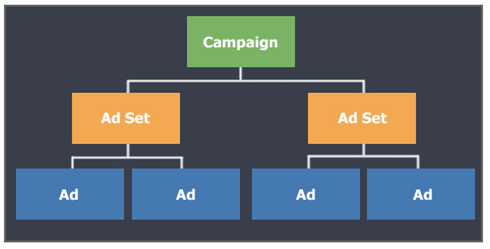
Within the campaign Facebook breaks the marketing objectives into three categories. Awareness which is to generate interest in your product or service. Next is consideration, to get people to start thinking about your business and look for more information on it. And the third is conversion to encourage people interested in your business to purchase or use your product or service.

How to target ads on Facebook

Image result for targeting cartoon

The more relevant the ads are to your audience, the more successful your advertising campaigns will be (Adams, 2019).  Facebook has a lot of targeting options:

Location: Identify cities, countries, and even neighborhoods where you want to do business.

Demographics: Choose the audience for your ad based on criteria such as age, gender, or education. 

Interest targeting: Reach people based on their interests, hobbies, and even pages they like on Facebook.

Connections: Reach people who are connected to your page, event, or application, as well as their friends. 

How Facebook Ads Work

The Ads Create tool will help you create ads based on your advertising objectives. Facebook will guide you through the necessary steps to create your Facebook ad, and ask you specific questions to get to the heart of what you want to advertise. To launch the Ads, create tool, head to your Facebook profile, select the arrow in the menu at the top right-hand corner. From there, you’ll choose Manage Ads. The first column you see contains the Awareness objectives. This includes promoting brand awareness for your business and extending your reach. The middle column you have the Consideration objectives. This will support your goal of getting more people to your website, creating more downloads to your app, and generating leads as examples. Lastly, the conversion column is all about getting your audience to take a specific action. These are things like buying a product off of your website. 

How to Create Facebook Ads

Once you’ve chosen your advertising objective, the next step is to identify your audience, choosing a highly-relevant audience is important. You want to increase a likelihood that people will not only interact with your ad, but they’ll perform the intended objective. The use of location, age, and keywords are great to narrow down the people you want to be advertising. You will be able to see your audience size with the gage on the right-hand side within the audience section

Refine your audience interest targeting

Interest targeting is really where Facebook advertising stands out (Adams, 2019). In the audience section simply select edit and scroll down to detailed targeting, this is where your interest will show up. If you are new to advertising there is an option to browse, where you will be able to view different interests available to select. If you decide to use multiple interest you have to remember that your audience doesn’t have to match all of the interest that you have selected, the only have to relate to one.

Refine your audience with behavior targeting

Behaviors are activities that people do either on or off of Facebook. Behaviors are constructed from someone’s activity as they browse the internet along with their offline activity, like spending. Behaviors are located in the same place as interests and are selected with the same processes.

Choose a budget for your ads

When setting up your Facebook ad, you’re going to need to decide how much your going to spend, if you are a newer advertiser than I would recommend starting small in the beginning. You can set your budget in the Budget and Schedule section under the Ad Set level. You have two options for creating a budget, daily budget and lifetime. 

Image result for budget cartoon

Daily Budget: how much do you plan on spending per day 

Lifetime budget: how much money you want to spend over the duration of your campaign.

Manage ad placements

Placements on Facebook is referring to where these advertisements you create show up on, and even off, the Facebook platform. When you’re in the ad creation tool, automatically Automatic Placements is going to be selected, and it is recommended by Facebook. It is recommended that you understand and see where your ads are showing up, so you are able to tweak your ad or even adjust image size.

To manage your placements Simply select edit placements in the Ad Set level, and here you can see all the different options for where your advertisements potentially can be shown.

Choose your ad creative

The type of creative you use will be based on the objective that you select.

The first step is to create an ad name and you will find that at the very top below that, you can choose to create an ad, or use an existing post. Below that is the identity. So, if you have multiple pages under your advertising account, it’s here that you’re going to choose your applicable page. Below that, you can advertise in Instagram. 

Now you are in the format section. You have two options. The single image or video or a carousel. Next is the media section. It’s here you get to choose your images, videos, or slideshow for your ad. Stock photography is a great option for newer advertisers that don’t have a huge budget to spend on photos.

Next is the text box, and it is exactly like what you would create for a post on Facebook. So, your posts can be a little bit longer, they can be wordier, and they don’t have to be super sales-y. Below that, you have an option to add an URL link.

View Your Advertising Data

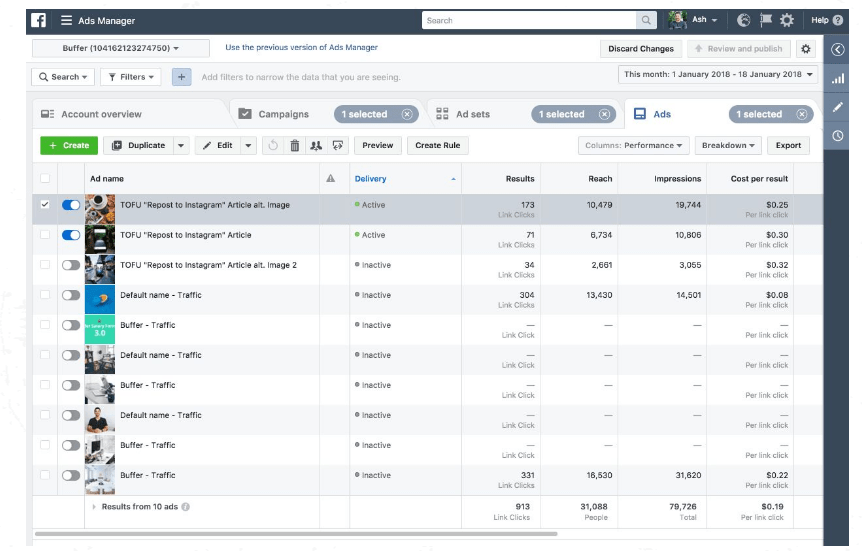
Your Facebook ads dashboard is your go-to location for keeping tabs on all your advertisements. To access it, go to manage your ads section from the dropdown in the upper right-hand corner of your Facebook account. The first thing to note is that you have four different tabs. Account Overview, Campaigns, Ad Sets and Ads. Now, the really important thing to note is the date range at the top. This is going to dictate the timeline or timeframe of information that Facebook polls.
This image has an empty alt attribute; its file name is image-2.png

How to create advertising reports

In order to understand how your advertising campaigns are performing, reports are essential (Adams, 2019). To access your reports, you’re going to need to be in your ad’s manager account, and you can find that by choosing manage ads from the drop down in the upper right-hand corner of your Facebook profile. You’ll find the reporting section at the top right, and it’s this drop-down menu that’s going to give you a bunch of additional options.

First will be the export table data. It will give you three different formatting options. Xl, csv or export to Facebook ads manager for xl. Next in the drop-down menu will be create custom report and this is where you will get snapshot of how everything is going to export into Excel. In the drop-down menu you are also able to quickly see your recently viewed reports for quick access. It is recommended that you check your advertisements daily.

Understand your success metrics

It’s really important to understand your success metrics. The things that you want to focus on right away are shown in the Campaigns tab. From the left you have Campaign Name, delivery status, where the budget is allocated, and results, which is where you really want to focus on. This is where you will be able to see data on impressions, how many people it reached, amount spent and how many link clicks.

View you billing summary

Facebook will show your advertising spend in two different ways. Under the amount spent you will be able to view of where your advertising money is going. It gives you a graph to get information per date on your spending. If you further scroll down you can see advertising spend broken out by objective. Continuing down you will be able to see the demographics. This is one really easy way to see how much you’ve spent advertising, but it might not show you what’s been billed to your credit card. in order to view that, we’re going to head to the Ads Manager menu and select billing and payment methods. This will show you payment method, amount billed and payment status. 

Implement Best Practices

Here are some must-know practices that will apply to your Facebook ad campaigns that will make your ads more powerful and truly connect you with your targeted audience.

  • Clear call to action
  • Highlighting any major benefits your product has over the competition
  • Use a simple, eye-catching image. 
  • Have someone else review your ad
  • Test and run multiple variations

How to choose an effective image for your ad

Great ad copy can be easily lost in the Facebook Newsfeed without a captivating image. When your deciding on your image think of the following:

  • Stock images make it super easy to have high-quality photos at your fingertips. 
  • Use images featuring people and bright colors
  • Consider how the image would look in a small size
  • Test your images

Improve the performance of your ads

Here are some ways to improve your ad performance

  • Are they relevant?
  • Create a landing page
  • Analyze reporting data
  • Target specific device users
  • Are your ads running to often?
  • Never stop testing and trying new things

Key Facebook ad policies

Your success with Facebook Ads is dependent on following some key guidelines. Here are some major policies to help you prevent your ads from being flagged for review. 

  • Ads in the news feed can’t have images with more than 20% of text on them.
  • The landing page must be relevant to your ad
  • Be respectful and honest

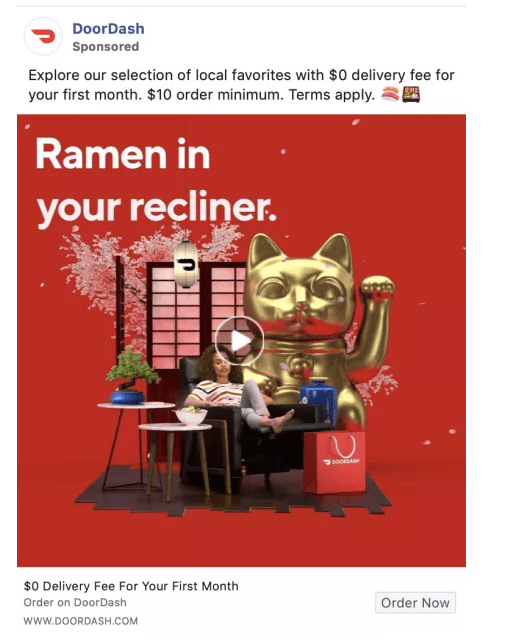
Here is an example of a Facebook Ad by DoorDash. Following the above tips and staying within the Facebook policies they were able to create a very high quality but simple Ad that would catch your eye.
Conclusion

In my own opinion, Facebook is one of the best platforms for a beginner to create an ad. They offer you multiple budget plans to help you get started as well as a very clear and precise way of viewing your ads and tracking its data. Some of the important points to take away: Be sure to keep trying and don’t give up it wont be perfect on the first try, know what your audience is and how your going to target them, and be creative with your ad. Social media marketing is massive and your going to be constantly competing against other ads, be sure not to get down if it doesn’t start out as planned. Adjustments of your ad and your target market will have to be constantly monitored and the ability to adapt is essential. Will you give up if it doesn’t work at the start or will you stay persistent until its perfect?

References

Adams, M. (2019, Oct 2). Advertising on Facebook. Retrieved from LinkedIn Learning: https://www.linkedin.com/learning/advertising-on-facebook-2/next-steps?u=2109516

Debono, J. (2012). 5 of the Biggest and Still the Best Online Advertising Methods. Retrieved from https://www.business2community.com/online-marketing/5-of-the-biggest-and-still-the-best-online-advertising-methods-0186358

Karlson, K. (2019, July 22). 162 Best Facebook Ad Examples. Retrieved from https://karolakarlson.com/best-facebook-ad-examples/

Franklin, J. (2018, Dec 10). Why you cant convert Everyone. Retrieved from TRO: https://troleads.com/why-you-cant-convert-everyone/

Learning to Write Market Copy

Hi everyone today I will be sharing to you my first blog and how Ian Lurie provides both wholistic, overarching directions and specific checklist suggestions regarding strategies to get your marketing campaign off to a good start and bring it to a successful fruition. This summary will include highlights from four chapters of Lurie’s video, Learning to Write Market Copy including overview of Market Copywriting, Writing Copy, Rewriting Existing Copy, and Lurie’s own concluding insights.

Overview of Marketing Copywriting

Lurie defines market copywriting as “. . . writing copy for the purpose of marketing or advertising.” He asserts that this copy is “. . . the heart and soul of any campaign strategy.” Whatever the end product evolves into, it ALWAYS began with writing on the paper.

3 Ways to Write a Research Paper on the History of the English ...

There are three purposes inherent in marketing copywriting including: 

  1. The content delivers value to people when they need it.  Lurie would say that it ‘preaches to the choir’ in that it is persuasive mostly to those who want to respond. 
  2. Market copywriting is more than writing, it is strategy = plan of what content to include and the tone of the presentation, and finally,
  3. Copywriting has a specific outcome to achieve and the writing is geared to attain that goal; this is a call to action which may be to buy, vote or prepare for an event.

Lurie continues to highlight the diverse elements of marketing copy that result in the nature of the call to action being successful or not.  The most basic element is the writing, the words on the page. Later in his video, Lurie outlines a most scientific approach to the presentation of this basic and foundational element. The market copy writing serves as the first contact for the call to action attention, an attention getter where the author piques the interest of those interested compelling them to continue to read and view the information.  The writing is often a balance including content and visual creativity.

Lurie cautions though, that marketing copywriting is one of the most challenging disciplines because there needs to be a balance between creativity with a call to action and this balance is critical contributing factor for a successful campaign. The call to action does three things:

1.         delivers significance: communicates the content is worthy of attention for those who will not buy but will spread the word; often referred to as USP (unique selling position),

2.         appeals to a niche audience: value to the person who will buy

3.         provides value: return on time invested by readers – first investment in your product.

Word Writing Text Create Engaging Content. Business Concept For ...

Lurie challenges the video viewers to consider all the ways the marketer would interact with his/her customer/audience.  The plethora of possibilities are categorized into three types: collateral, which I would connect with the format of presentation; the medium, which I would associate with the platform of the presentation of the market copywrite; and third, the style, which I would refer to as a strategy. The collateral each have their advantages.  They range from the most common format, the brochure, an all-encompassing presentation; the direct marketing, which is all about the pitch; the poster, which often doubles as a graphic; the script, whose nature and use depends on the audience; the one-liner, that is often used without context; and the product discretion, which is often used in combination with another type of collateral.

The medium is defined as, “. . . the pipe over which the message passes. . .”.  Our contemporary times have introduced the Internet and online communication including mobile, website, or social media networks as a new channel of marketing in addition to the print, media, audio, video and in person contact with our audiences.

And finally, the style of the market copy employed as Lurie states is unique to each writer and product. Style can range from teaching, throwing a pitch, delivering a straight shot, humor by making your audience laugh, using a scare tactic, or taking a hard sell approach. All of these have distinct characteristics and pivotal to their effectiveness is knowing the audience and context for delivery for best results and response; the marketer has to be ready to flex and modify accordingly.

This picture resembles that there are many more then one path to take when dealing with different audiences.

Essentials of NationBuilder 3) Using Goals and Paths - FourTier ...

Writing Copy

In this chapter of the video, Lurie describes in specific detail a recommended process of several most personalized best practices of the trade to follow as a marketing copywriter. The ultimate benefit he reveals if these strategies are followed include effective time management, maximum productivity as a result of focused writing and personal well-being; not to mention a good product which will ultimately lead to audience responding positively to the call to action.

His recommendations to engage in the writing process begin with preparing self.   Self-discipline is important is setting yourself to your task and establishing a distraction-free workspace including communicating work intentions to others, setting time limits and planning breaks. Next is assembling your tools. Attending to even the smallest details is imperative such as a glass of water or a charger plugged into the wall to pausing email correspondence and sequestering yourself in your workspace with sound cancelling headphones! Timeline and pacing also contributes to effective motivation to be able to engage the task at hand: building in time limits and breaks. Then to the writing at hand, begin to create the plan. Lurie recommends spending some time to brainstorm options for your writing: including medium, style and collateral always in consideration of your audience – what will work and eliminated what will not work. Lurie believes ‘free writing’ is a critical first step in getting the thoughts onto the paper; it serves to steer your thinking in the right direction; letting ideas onto the paper, thinking of the audience, thinking of the outcome and thinking of the call to action. This leads to the first draft. 

Despite writing being unique to each author Lurie brings the science of writing into play recommending some general rules of thumb that contribute to the success of marketing copy.  The reader should be addressed personally (you/your), focus on quality not quantity, avoid sarcasm in writing and use clarity and directness in your presentation. There are specific formulas for headlines including scenarios to test them, (albeit easier online than in print). And there are mathematical measurements and ratios for text and typography different for different media.

Quality Over Quantity - The Holy Hustle - Medium

As the final draft comes closer to fruition, Lurie encourages a collaborative process as a positive approach; another set of eyes is welcomed provided time allows. Contrast editing and proof-reading saves time; editing coming first. Use an active voice in writing and avoid the vernacular. Concise writing and logical sequence support the success of the draft and the impact the marketing copy has on the call to action and to do well. Ideally you want to entice the readers to continue reading your copy. This is a hurdle when overcome, leans more towards a successful call to action.

Rewriting Existing Copy

Lurie emphasis on the importance of collaboration is reiterated in the process he outlines for rewriting existing copy.   He describes this process as high level editorial work as opposed to rewriting from scratch. This team approach has as its goal, improving without restructuring. This demands that the reader has some context for the piece keeping in mind, less is more; working to meet the challenge to balance brevity with the entertainment side.  That is concise, articulate and clear focus keeping the outcome, the call to action as the goal.

Conclusion (Video)

In this final chapter, Lurie provides a checklist of criteria for effective team management.  He is commended for prioritizing the well-being and mental health of his team members and himself.  He maintains that if this remains the priority, the natural consequence will be the success of his company as his audiences respond positively to the call to actions with which they are presented.

The 40-point SEO checklist for startups - Search Engine Land

Conclusion (Student)

As an upcoming marketing student there were many components that Lurie went over that I found myself familiar with through this course. As simple as some of the components were, at times I still found myself taking a step back and reflecting on what he was saying. One example as small as it was, is when he mentions the term “sell”. A lot of people hearing that think of dollar value, but he goes to mention it can be for selling a vote or an idea. This is common knowledge to most people but it is one of those points that can be easily forgotten. Marketing copywriting can be used for much more than just promoting a single product to an audience. Another point that stood out to me was that copywriting is the heart and soul of any marketing strategy, in other words it’s the first line of attack to your audience. It can be out front like a brochure, business card or poster or can be more behind the scenes like a script for a video. In the end though a marketing strategy starts with copywriting. From this video I reinforced my common knowledge and took away some points that will make me think on some decisions while dealing with marketing. An example I can relate at this point of time in my life from this course is the business cards. I am marketing myself with my card and as stated above it is my first line of attack. Following the steps Lurie has mentioned in the video I can implement a direct and creative way to showcase information about me on a small space.

Refrences

Lurie, I. (2014, May 30). Learning to Write Marketing Copy. Retrieved from LinkedIn Learning:

https://www.linkedin.com/learning/learning-to-write-marketing-copy/welcome?u=2109516

Social Media Marketing: ROI

Hey there everyone! Hope all of you are doing well in these weird times of covid-19 quarantine. With more time on most peoples hands due to social distancing take the oppurtuinity to read my blog on the course “The ROI of social media marketing” taught by Carlos Gill. Within my blog you will find all of the main points that I found worth sharing from Gills course.

Social Media KPIs and Tools for measurement

Aligning social media and business strategies:

  • Where are your customers? Facebook, Instagram, or other platforms
  • What are your competitors doing or not doing?
  • what is your purpose for being on social media? Is it to drive customer acquisition, leads, brand awareness, customer service, or talent acquisition? 

Using social media for business is not limited to just positing once a day and checking back in regularly. No. It requires a full business strategy centered on content, community, consistency, and conversion which I refer to as the four pillars of a social media strategy. 

Metrics you should measure, otherwise referred to KPIs or Key Performance Indicators, will vary based on the type of content that you post as well as your objective for posting.

Some of the major metrics that should be measured are:

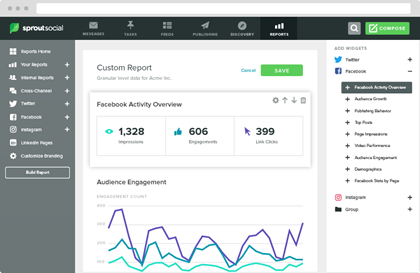
  • Impressions
  • Engagements
  • Views
  • Clicks

All metrics matter as they are an indication as to whether or not your content is performing favorably amongst your audience of followers.

There are tools that can be used to help you measure.  The tools that you use will vary based on your needs and also the size of your business as most tools charge a premium or monthly fee to unlock the most critical features outside of basic posting. Do take into consideration that some platforms have built- in tools already.

Decoding Social Media Analytics: What Does it Mean?

Facebook is a great platform to place your content in front of a targeted group of its users based on demographic and interest-based data. Facebook is a digital advertising platform and operates similar to a casino, whereby the more money that you spend, the higher likelihood you have of winning the game in the form of customer acquisition (Gil, 2019). The lifeline of a Facebook post is not very long and will only be relevant for less than 24 hours, unless it gains significant traction within the Facebook algorithm, which serves up content to its users based on the actual user engagement, which is why monitoring your post performance and repurposing old content is critical to boosting organic reach. Facebook also offers the integration of Shopify which allows your Facebook page to be leveraged as a shoppable online storefront where you can list products for sale, and Facebook users can buy from you without ever having to leave the site.

Driving a Measurable ROI on Each Channel

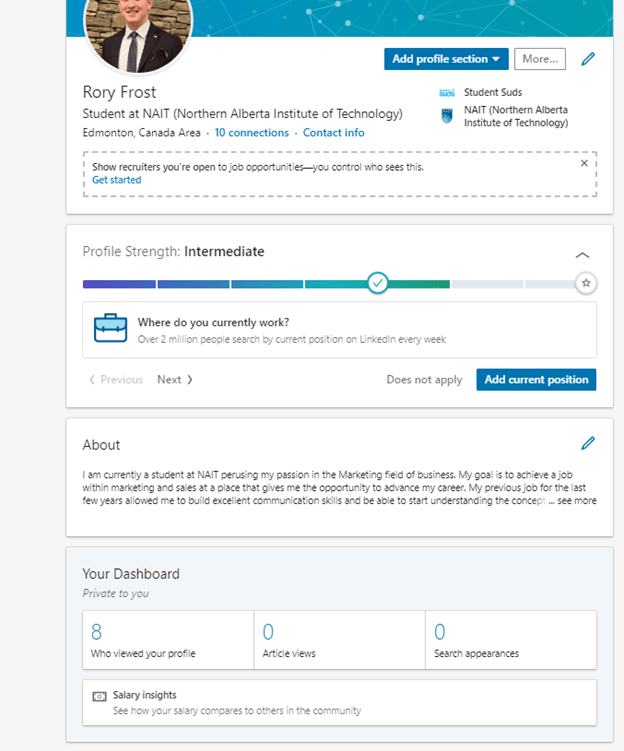
LinkedIn is the go-to social network for business professionals around the world. Having a defined presence on LinkedIn can be a tremendous asset for any business owner, executive, or professional by way of new contacts, lead sources, and clients. Due to the rise of internet fame and business thought leadership your personal brand is also your resume and business card. With LinkedIn, you can see who’s viewing your profile and it’s easy to do.

Another platform you can use that has potential to earn you revenue is YouTube. The more content that you create and the more views that you receive the more money that you will make by running ads on your videos. Before you get to excited about revenue from videos do take a few things into account:

  • YouTube requires 1000+ subscribers to monetize
  • create a list of 12 to 15 tutorial or how-to videos to act as anchor videos.
  • Title your new videos with key words, such as tips, how to, and the best. 
  • Retitle existing videos for improved search optimization.

The science behind YouTube is less about posting quality content and more about having the right mix of searchable titles, keywords in your video description, and tags in your videos, otherwise known as YouTube SEO (Gil, 2019).

Here are some tips on how to use video content on social media:

  • Have a purpose: entertain or educate
  • Optimize titles and descriptions
  • Teach with how-to videos
  • Outsource production resources

Bonus Strategies for Maximizing ROI

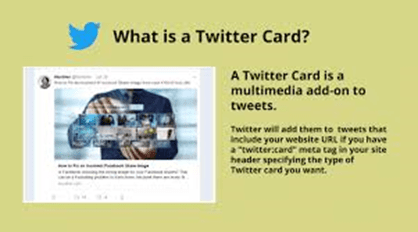
Twitter Cards offer a way to make your content stand out and drive website link clicks without putting the link in the body of the tweet, thus offering more characters to work within Twitter’s 280-character count limit. Twitter Cards are also an easy growth hack to improve your click-through conversions for free.  Twitter cards require creativity and strategy in the form of an eye-catching visual.

Social media storytelling is a newer form of content marketing made popular by Snapchat and Instagram, as well as YouTube personalities. With stories, think of yourself as the star of your own reality series. The key to telling good stories in social media is less about the platform and more about the story that you’re trying to convey. Because stories expire within 24 hours of being posted, your stories should be short, attention-grabbing, and drive users to take a specific call to action.

Today’s average social media user sees your content on a mobile device, or while quickly scrolling through their newsfeed. Therefor your content captions should aim to be short, direct and to the point. 

To make an effective post, keep these guidelines in mind:

  • Make sure that your posts are one to two sentences in length
  • Lead in with an open-ended question whenever possible
  • Refrain from using call to action, such as comment below, like this post
  • Do not post a link in the caption.

Conclusion

In my opinion the most important piece of information I took away from this course was the four pillars your social media strategy should be built around. Content, community, consistency and conversion.  No matter the platform being used, these four pillars need to be applied. I personally don’t have a business social media account at his time, but in the meantime I will start by applying these to my personal account. I do post pretty interesting content in my opinion, but definitely need to work on consistency. Going forward ill be referring to these pillars while using social media and posting. Ill gather information about my posts and their metrics and use what I learn through my personal accounts and apply it on a business page in the future.

References

Gil, C. (October 9, 2019). Social Media Marketing: ROI. Retrieved from https://www.linkedin.com/learning/social-media-marketing-roi-2/the-roi-of-social-media-marketing?u=2109516

Social Media Marketing: Social CRM

Social Media Marketing: Social CRM

Today I will be sharing with you the major key points I took out of the course “Social Media Marketing: Social CRM” taught by Meghan Adams. She goes over the fundamentals of social CRM and shows you how a social CRM strategy enables your organization to better engage with your customers in a transparent and more powerful way. Adams also explains how to choose a social CRM platform, how to allocate resources for this new initiative, while identifying working with online influences, engaging with prospects and customers, and how to build out social media focused customer service initiatives.

The new way of marketing

Social CRM helps to combine all information pulled from social media and other conversational platforms. And it uses CRM analytics to determine how an organization can best use this information. Social CRM adds in the social data points so organizations can better track and measure their audience’s behaviors online. Traditional CRM and social CRM are combining as consumers spend much more time online and on different social media channels like Facebook, LinkedIn, Instagram and Twitter (Adams, 2018).

Benefits of Social CRM

  • More meaningful engagement
  • Creation of brand advocates
  • Helps construct brands image and conversations online

How to add social CRM to your strategy:

  • Marketing – Social listening to learn about your online audiences’ behaviour
  • Sales – Understand where prospects are online and what they’re discussing
  • Customer service and support – Real-time, multi-channel support
  • Customer Experience – Understanding what your customers needs and wants are and creating an exceptional, unique experience for them

Choose a social CRM platform

Customer relationship management software has evolved from a simple contact management system into a robust set of tools, and all of these tools can be found in one central-hub and that is your CRM platform.

Image result for social media platforms

Three reasons to use a social CRM platform:

  • Sales – Looking to automate and boost sales
  • Marketing – Looking to streamline finding and engaging with customers and prospects
  • Customer service and support – Looking to deliver outstanding and responsive customer support

When choosing a social CRM platform, there are some MUST HAVES you should look for when deciding:

  • Support for social media platforms
  • Brand monitoring
  • Social CRM analytics
  • Integration with your other platforms or services

Allocate resources

Your social CRM success will depend upon organizational support and allocation of resources (Adams, 2018).

Resource allocations to consider are:

  • Top-level support and buy in
    • Identify decision makes and influencers
    • Making your business case
  • Budget
    • Invest in growth
    • Use analytics to drive business case
    • Benefit to sales, marketing, and customer support
    • Work with your Social CRM provider
  • Build your social CRM team
    • Staff your social CRM team with early adopters
    • Determine the roles and required headcount
    • Invest in your social team
  • Training
    • Look to your social CRM provide for training opportunities
    • Direct resources to new initiatives
    • Support you social CRM team
  • Monitor and Evolve

Develop Your Strategy

Branding

 A brand is a set of marketing and communication methods that help distinguish a company from competitors and hopefully create a lasting impression in the minds of their customers (Adams, 2018). When branding there are two social factors to consider when branding, humanization and personalization. Humanization is having an easy way to connect with people and their personality. Personalization is allowing the customers to choose and shape their own experience with your organization. Another way that branding in your social CRM strategy is so important is that it helps you really support your customer.

Rules of Engagement

How you manage, execute, and handle your social CRM all boils down to your rules of engagement. Laying out clearly defined rules will set the standard for every prospect and customer interaction your organization has. The standards you set are completely dependent on your organization but typically include tone and personality, set response to specific situation. personalized responses and guide lines for communicating company-wide announcements.

Some Very important other rules to consider are:

  • Be sure you are responding in a timely manner
  • Be proactive in your responses
  • Use a social media monitoring tool
  • Humanize your conversations
  • Know when to take it offline
  • Get feedback often

Manage Social CRM

Identify Influencers

Influence is defined as a power affecting a person, thing, or course of events, especially one that operates without any direct or apparent effort (Adams, 2018). When talking about influence in social marketing though a great quote that sums the meaning up is “True influence drives action, not just awareness.” -Jay Baer, social media guru

Here is an example of a video using a influence to help promote.

Here’s how you can identify influencers:

  • Look at their audience and advocacy
    • Relevance: How relevant is their message and network to yours?
    • Reach: How many people can they reach with their message?
    • Engagement: How engaged is their network?

The main methods to find influencers for you is through social media monitoring, hashtags, blogger outreach and google alerts. When you have found an influencer that fits for your brand there are a few ways to work with them:

  • Encourage content creation
    • Post photos and videos of them using your products/services
  • Product giveaways and discounts
    • Keep them current with your latest products, or provide compensation or discounts

Engage with prospects

Image result for engage

To engage with prospects successfully you will need to paint a complete picture of who they are. Which means your organization knows where they are in the sales cycle and what previous interactions have, they had with your organization. When engaging with a prospect be sure to connect your content to them, keep the content engaging and know when to pitch and when not to. Be sure you are always leading with value.

Customer Service

Integrating customer service with social CRM is the ultimate way to support the social customer (Adams, 2018).

Social CRM:

  • Customer retention – Facilitating support in the customer`s preferred environment
  • Issue prevention – Intervening before the issue is escalated

Here are some of the best practices you can implement in you customer support:

  • Monitor – Understand what is being said about your brand
  • Identify – Determine if the problem your customer is facing is product, service, user support
  • Contact – Take real-time action and reach out immediately
  • Acknowledge loyal customers
  • Intelligent relationship routing
  • Handle channel hoppers

Handling Negative Feedback:

  • Monitor internet for activity
  • Bring relevant postings into customer support queue
  • Facilitate employee collaboration
  • Kick off resolution with the customer

Be sure to remember that every customer issue that arises in the social space is a marketing and PR opportunity. The world is watching (Adams, 2018).

Your toolkit

Process documentation

Business process success criteria

  1. Ownership
  2. Goals
  3. Metrics
  4. Interfaces
  5. Documentation
  6. Integrity
  7. Alignment with business vision

To ensure that all your organizational teams are on the same page, typically your organization will have three main goals. The first is creating a new standard for optimizing customer relationships. This is focusing on new systems and a new customer experience. Second will be building connections with customers via new technologies, so this is the social landscape. And it’s prioritizing a human driven, human centric interaction with these customers. Third will be leveraging new channels that offer a path to more personal communication. This will be communications say across mobile, video and social media channels in order to achieve more targeted and humanized approach.

Document your business process and use them consistently. Keep your team accountable (Adams, 2018).

Conclusion

One of the key points I took out of the course is the process of finding yourself an influencer. There are so many influencers now days, it seems a new on pops up every week, which can make it difficult to pick from such a large selection. But in that process the ability to really focus on What Adams said about what you should be looking for: Relevance, Reach and engagement is key and I personally feel its very easy to forget those three points. I personally can’t relate to an applied example of me finding an influencer because I have not yet created a brand or product of my own yet to send to one. But when that time does come, I will not forget the main points I stated above. Its not about who you relate to or who you connect with as a person, its about what your brand or product connects to and relates to. If I had to pick an influencer right now there would be a few on my list that probably would have nothing to do with my product. So, having the maturity to stay away from your personal favorites when looking for a influencer and following the three key points will play a big factor in the positive repercussions that follow after collaborating with an influencer.

Reference

Adams, M. (2018, April 11). Social Media Marketing: Social CRM. Retrieved from https://www.linkedin.com/learning/social-media-marketing-social-crm/process-documentation?u=2109516

Cook, K. 13 Influencer Marketing Campaigns to Inspire and Get You Started With Your Own Retrieved from

https://blog.hubspot.com/marketing/examples-of-influencer-marketing-campaigns

Creating Your LinkedIn Profile

“LinkedIn is no longer an online resume. It’s your digital reputation.” – Jill Rowley

Learning LinkedIn for Students

Hey there! Today we will be talking about the platform LinkedIn and what I have learned from the Course “Learning LinkedIn for students” instructed by Oliver Schinkten. During this course he takes the perspective of a student and goes through step by step on how to create a profile, features LinkedIn offers, building your network and how to begin searching for jobs and opportunities to start developing your career.

Create a LinkedIn profile

Setup account

First you can begin signing up for an account by navigating to LinkedIn.com and filling in your name, email and password you want to use. It is wise to create a quality password for your account since you’ll be sharing very personal information inside of your profile. Will then ask to select the country you live in and if you are a student or not. You have the option then to link your email contacts to your profile to start finding connections right away. The last page allows you to add a photo. Once through all the above steps, you are ready to start customizing your profile.

Add a photo and background image

Having a photo of yourself allows you to attract many more views to your account than a profile without one. To add a photo just simply click on the camera icon in the center of your profile and it will bring you to your documents allowing you to choose which ever one you want. Once you have selected LinkedIn has a great tool, allowing you to edit your picture however you want.

When selecting your photo take into consideration the following:

  • Recent photo
  • Proper framing
  • Quality of the picture
  • Professionalism (LinkedIn is a professional platform)

Another great image to add is a background image. Adding a background image will make your account stand out over the others. To select a background image, click on the pencil icon to find your “edit profile” page, once their simply follow the same steps as you did with your profile picture, but this time selecting a background image.

Personalize your headline

Image result for personalize

When people visit your profile, the first thing they will see is your picture and background, but the first thing people will read is your headline. Be sure to use something that defines who you are and what you want to become. Use keywords to have your account pop up when searched by others.

Add a summary

The summary section is an extremely important part for your profile. It is an opportunity to share some of the accomplishments but also to share your mission statement, your career goals and aspirations, personality and why it is you do what you do (Schinkten, 2019). Like your headline, use keywords to allow your profile to pop up when those words are searched. To edit your summary, refer back to the pencil icon and scroll down to the summary section. When writing your summary note that only your first sentences will show, so make it attention grabbing so people want to read further about you.

You can create the rest of your profile before summary if you want it may give you more insight to what you want your summary to look like. Spend sometime considering the following

  • Who are you? What defines you?
  • What is it that you do and why is it that you do it?

Work experience or volunteering

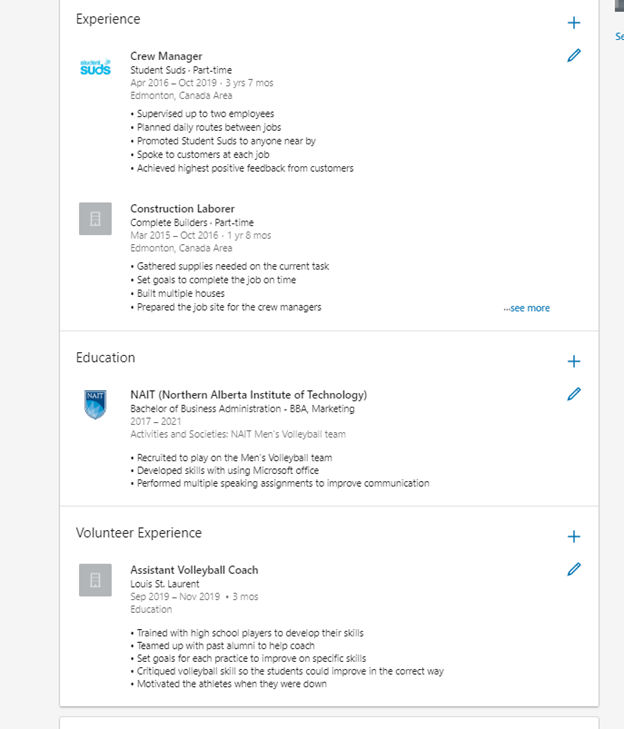
To add work experience or volunteering, click on the “add new profile section” drop down menu on the right-hand side. This will allow you to add any experience or volunteering you have done. Bullet points are best for this section, as it makes it easy for people to read. Volunteer experience can as well make your profile stand out over others, it is attractive to collogues and employers.

Education

As a student the education section is extremely important. List not only the schools you are attending or have attended, but also any majors or degrees that you have earned or are currently working towards. You can also add any clubs or extracurricular activities that you participated in. This can be put in the “Activities and societies” section.

Image result for education

To add education, click on the plus button under education which allows you to edit your current education or add anymore that you have completed in the past.  In the description it is recommended to use bulletin form for the same reason as the work experience and volunteering section.

Add skills and endorsements

You are also able to add your skills to your profile. It is recommended to add at least 5-10 skills at the beginning, but you can add up to 50. LinkedIn members with more than five skills listed on their account are 27 times more likely to be discovered in searches by recruiters (Schinkten, 2019). It is important to add these skills so you will be able to receive endorsements for those skills from others once you grow your network.

Image result for skills

You can start receiving endorsements by asking people that you have collaborated with:

  • Classmates
  • Professors
  • Coworkers

If you’ve truly demonstrated these skills, people will usually be happy to endorse you for them. 

Recommendations

Recommendations are more in depth than asking someone to endorse you, but it gives and opportunity for someone to express your skills in a more detailed manner.It may be a boss, instructor or professor. Or anyone that you have collaborated on a project with.

Before asking someone for a recommendation, be sure they are a first connection of yours on LinkedIn, meaning you are connected to them as well as them to you.To request a recommendation, you can go to the profile of who you want to request and click on the “more…” dropdown and click request a recommendation. As well on that drop-down menu is the option to write a recommendation for them. Make sure not to abuse this feature. You should only receive recommendations from people that you’ve had the opportunity to collaborate with, who can truly speak about the value that you provide.

Add additional sections

There are many additional sections you can add to your profile. To find them refer to the “add new profile section” dropdown at the right-hand side of your profile and click on accomplishments. This is where a list of different types of sections you are able to add to your profile.

Configure your public profile

When someone searches for you online, for example, on Google, often, one of the first things that they’ll come across is your public LinkedIn profile (Schinkten, 2019). They’ll be able to view this without being logged into LinkedIn. You are able to customize what people can see on your public profile by customizing the settings. To do this click on the “edit public profile and URL” on the right-hand side of your profile. This will give you many different options for you to edit your public profile. LinkedIn will provide an image of your public profile so you are able to see exactly what others can see when they search for you.

Within this page your also able to customize your URL as well. You can customize your URL so that it’s easier to share. You may want to share it on something like a business card, a resume, or an email signature.

Build Your LinkedIn Network

Create a professional network

Connecting with other professionals and creating a solid professional network is one of the most empowering things that you can do A strong professional network can help to provide insight and advice, knowledge and the exchange of ideas, collaboration opportunities, access to resources, and often it will open the door to job opportunities. 

Two of the most popular ways that companies find new hires are through employee referrals and social professional networks (Schinkten, 2019).

Consider connecting with the following three types of people to build your network:

  • The advocate: This is usually somebody that you know on a personal level. 
  • The strategic “in”: Someone who’s well-connected.
  • The subject matter expert: Someone who offers superior insight on a specific industry.

Connect with people on LinkedIn

Image result for connect with poeple

One of the great benefits of LinkedIn is how quickly and efficiently you can create a powerful network of connections. There are several different ways you can find connections:

  • Search for a specific person
  • Search for a company and then view their employees
  • Search an industry
  • Using the My Network tab and connecting with email contacts
  • Using LinkedIn’s “People you may know” page 

Improve your LinkedIn search

When searching on LinkedIn you may see millions of accounts pop up if your search is too vague. You can use filters when searching to narrow your search down. These filters can be found on the right-hand side of the page when searching.

 Another tip that can help you when searching on LinkedIn is to utilize Boolean modifiers and search operators.

Boolean Modifiers:

  • “quotation”: used to find exact phrases.
  • (parentheses): allow you to perform more complex searches using Boolean logic
  • NOT, OR, AND (all caps)
    • Used to narrow down your search

 Search operators:

  • First name
  • Last name
  • Company
  • School

LinkedIn groups

LinkedIn groups are trusted communities where professionals with shared interests can ask questions, share insights, and build meaningful connections. As a student groups are a great way to connect with other professionals who are interested in a specific topic. In the home tab you can find a tab for groups on the left-hand side. Inside the groups tab you can find several groups listed and all have links to bring you to their homepage.

Using LinkedIn Day-to-Day

LinkedIn Newsfeed

You are able to access your LinkedIn newsfeed at any time by simply clicking on the Home icon at the top of the page. LinkedIn’s algorithm does an amazing job of customizing this for you, showing what you are most interested in (Schinkten, 2019). Most of the articles shown are of excellent quality and will help you keep up to date and give you a sense of what’s trending. Use the newsfeed to keep yourself up to date on news and trends related to your field.

Follow companies and influencers

As you begin to follow more people, groups, companies, and more on LinkedIn, your news feed will become more and more customized. For this reason, Oliver recommends you start searching for some companies that you’re interested in and then following them.

You are able to follow someone without connecting with them. Following someone will have their post pop up in your news feed, but your profiles are not actually connected. It is recommended that you follow influencers that are thought leaders in certain industries. LinkedIn has a page that recommends influencers that you should follow. You can access this by navigating to linkedin.com/feed/follow (Schinkten, 2019).

Digital footprint: Build your brand

Nearly everything you do online contributes to your digital footprint, which is essentially becoming your own personal brand (Schinkten, 2019).

Image result for build your brand

Majority of employers have reported that they look up potential candidates online when considering who to hire. LinkedIn is one of the major platforms that they look at (Schinkten, 2019).

Avoid a negative footprint by staying away from:

  • References to drugs an alcohol
  • Bad mouthing others
  • Discriminatory behaviour
  • Poor communication skills
  • And any other negative behaviours

Build a positive digital footprint by:

  • Convey a strong professional image
  • Personality is a fit with the company culture
  • Showed great communication skills
  • Well rounded
  • Wide range of interests

Share updates and content

Opportunity to share content and updates in order to provide value to your network and help build your personal brand. When you come across interesting articles or news stories related to the field, you’re in, share them with your network. In doing so, not only do you provide great value for others, but you also help to brand yourself as a thought leader in your field (Schinkten, 2019).

Publish Articles

LinkedIn’s platform makes it easy for you to write pots, make it look professional and then share it with your network. On your home page you can find a button that says “Write an Article”. Here is where you are able to create your own article. Once you have made the post, LinkedIn gives you data about your post like the amount of views, reshares etc.

Send and receive messages

At the top of your LinkedIn page you can find a messaging button. In here you able to create a new message or view any old conversation’s you have had between someone. Another feature on LinkedIn is, instead of having to go to the separate messaging tab you can find a quick chat in the bottom right corner of LinkedIn. Here is a handy pop up tool to send out and view your messages without having to stop what you are doing.

Job Search and Company Research

Explore potential careers and companies

If you are searching for jobs. LinkedIn can act as an excellent tool providing you with insight, guidance and inspiration (Schinkten, 2019). A great way to use LinkedIn to find potential careers is to search for different companies. Take a look at companies LinkedIn page and see if this is a company that you would be interested in. Company pages on LinkedIn are filled with valuable information related to a specific company. If you are following a company, their posts can be found in your news feed.

Image result for explore careers

To search for jobs, you can click on the button “jobs” at the top of the page. Here you will be able to find jobs that are fit for what you are looking for, you may find jobs that you weren’t aware are being offered. Another way to search is using the search engine in LinkedIn and search for your industry and use the filter option to view jobs, being offered in that field.

LinkedIn also offers you to create a job alert allowing you to be notified if any job appears that you are looking for. To set up a job alert just simply navigate yourself to the job tab and then click the job alert button.

Manage Your LinkedIn Account

LinkedIn Premium

LinkedIn premium offers a few more options then a free version. Some of these differences are:

  • Ability to send InMail
  • You can view company insights
  • Move up on job applications,
  • See who’s viewing your profile 

Explore privacy settings and account types

Any time you participate in a social network, Oliver highly recommends that you explore and customize your privacy and account settings. To adjust these settings, you need to click the Me drop down menu and then click on privacy and Settings. In here you will find three tabs; Account, Privacy and Communications. All of these tabs have options to customize your privacy setting. 

Downloading your data and permanently deleting your account

It may be a good idea from time to time to backup and download your data on LinkedIn. To do this you are going to want to navigate yourself to the top of the page and click on the Me drop down menu, from here, select Settings and Privacy. Once in this tab you have the option to backup and download your data.

You also have the option to completely delete your account. Be careful with this option because once you delete your account there is no way getting it back unless you have saved it elsewhere.

Conclusion

In my own opinion, LinkedIn is the best sight to create a profile that shows off the personal brand you have created for yourself. It lets others see your major accomplishments, awards, as well as your goals. With the use of the tips given in this blog you will be able to create a very strong profile for yourself and can start growing your LinkedIn network. With the help of keywords within your profile, it will help attract employers and other people that are related to your field of work. Before this course I personally had not created a LinkedIn profile, but as I went through it I slowly started to build myself a strong profile for myself.

My profile still can use a few touch ups, like my background image which I have not added yet, but overall I am very pleased with the profile I have created. I will continuously be updating my profile as I continue on into the future, adding any more skills or experiences I find my self achieving. LinkedIn is a very powerful platform to help your career. I would highly recommend going back through the steps I have given you and start creating your profile right now!

References

Schinkten, O. (2018, October 18). Learning LinkedIn for Students. Retrieved from https://www.linkedin.com/learning/learning-linkedin-for-students/welcome?u=2109516

Michaeldb. Connect people business social network line image. Retrieved from

https://www.vectorstock.com/royalty-free-vector/connect-people-business-social-network-line-connec-vector-510680

CBR. New services still require core IT skills. Retrieved from https://www.cbronline.com/digital-transformation/new-services-still-require-core-skills/

Callahan, S. (2017, June 13). 101 Sales and Marketing Quotes to Read Before Setting Your Strategy. Retrieved from https://business.linkedin.com/marketing-solutions/blog/content-marketing-thought-leaders/2017/101-sales-and-marketing-quotes-to-read-before-setting-your-strat

Design a site like this with WordPress.com
Get started