“Stopping advertising to save money is like stopping your watch to save time” – Henry Ford
Facebook Advertising Overview
Advertising through social media is massive in today’s age and is one of the biggest ways to get your brand out there (Debono, 2012). There are many different platforms you can use to advertise on social media, but today we will be looking more closely into Facebook and how you can simply make an advertisement of your own. Facebook is a powerful place for businesses, offering a very simple way to create an ad to help build you business (Adams, 2019). Facebook ads come with lots of flexibility with budgets, allowing you to run an ad for as little as $5 a day. Before posting your ad, you need to have a clear goal set out for yourself of what you want the ad to achieve. For example, if you want more people to your online website. After your goal is set you want to define who will be your target audience and what will be your budget
While advertising on Facebook you are able to create different advertisement campaign with different advertising objectives. Your advertising objective is what you want people to do when they see your ad. Using the same example as above, if you want ppl to visit your website you can make an ad encouraging them to do so.
Before you get started, you will need a Facebook brand or business page. Once your page is setup you will need to access the Ads Manager dashboard, to do so simply select the down arrow at the top right-hand side of your screen and choose Manage Ads. It’s here that you will get an overview of all the campaigns that you are currently running or have ran. This is going to be a major asset for the creation of your ad.
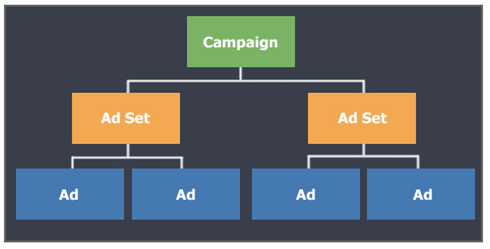
Once ready to create an ad simply click create and it will bring you to the advertising creation tool. The Facebook advertisement structure contains three levels:
Campaign: The top level of the advertising project and it determines a primary objective of your advertisement.
Ad Set: Where you determine the audience, placement of your ads and the budget, as well as the schedule.
Ad: This is where the creative, and things like the image and the copy and the headline are created. This will be what your audience sees.
Within the campaign Facebook breaks the marketing objectives into three categories. Awareness which is to generate interest in your product or service. Next is consideration, to get people to start thinking about your business and look for more information on it. And the third is conversion to encourage people interested in your business to purchase or use your product or service.
How to target ads on Facebook

The more relevant the ads are to your audience, the more successful your advertising campaigns will be (Adams, 2019). Facebook has a lot of targeting options:
Location: Identify cities, countries, and even neighborhoods where you want to do business.
Demographics: Choose the audience for your ad based on criteria such as age, gender, or education.
Interest targeting: Reach people based on their interests, hobbies, and even pages they like on Facebook.
Connections: Reach people who are connected to your page, event, or application, as well as their friends.
How Facebook Ads Work
The Ads Create tool will help you create ads based on your advertising objectives. Facebook will guide you through the necessary steps to create your Facebook ad, and ask you specific questions to get to the heart of what you want to advertise. To launch the Ads, create tool, head to your Facebook profile, select the arrow in the menu at the top right-hand corner. From there, you’ll choose Manage Ads. The first column you see contains the Awareness objectives. This includes promoting brand awareness for your business and extending your reach. The middle column you have the Consideration objectives. This will support your goal of getting more people to your website, creating more downloads to your app, and generating leads as examples. Lastly, the conversion column is all about getting your audience to take a specific action. These are things like buying a product off of your website.
How to Create Facebook Ads
Once you’ve chosen your advertising objective, the next step is to identify your audience, choosing a highly-relevant audience is important. You want to increase a likelihood that people will not only interact with your ad, but they’ll perform the intended objective. The use of location, age, and keywords are great to narrow down the people you want to be advertising. You will be able to see your audience size with the gage on the right-hand side within the audience section
Refine your audience interest targeting
Interest targeting is really where Facebook advertising stands out (Adams, 2019). In the audience section simply select edit and scroll down to detailed targeting, this is where your interest will show up. If you are new to advertising there is an option to browse, where you will be able to view different interests available to select. If you decide to use multiple interest you have to remember that your audience doesn’t have to match all of the interest that you have selected, the only have to relate to one.
Refine your audience with behavior targeting
Behaviors are activities that people do either on or off of Facebook. Behaviors are constructed from someone’s activity as they browse the internet along with their offline activity, like spending. Behaviors are located in the same place as interests and are selected with the same processes.
Choose a budget for your ads
When setting up your Facebook ad, you’re going to need to decide how much your going to spend, if you are a newer advertiser than I would recommend starting small in the beginning. You can set your budget in the Budget and Schedule section under the Ad Set level. You have two options for creating a budget, daily budget and lifetime.

Daily Budget: how much do you plan on spending per day
Lifetime budget: how much money you want to spend over the duration of your campaign.
Manage ad placements
Placements on Facebook is referring to where these advertisements you create show up on, and even off, the Facebook platform. When you’re in the ad creation tool, automatically Automatic Placements is going to be selected, and it is recommended by Facebook. It is recommended that you understand and see where your ads are showing up, so you are able to tweak your ad or even adjust image size.
To manage your placements Simply select edit placements in the Ad Set level, and here you can see all the different options for where your advertisements potentially can be shown.
Choose your ad creative
The type of creative you use will be based on the objective that you select.
The first step is to create an ad name and you will find that at the very top below that, you can choose to create an ad, or use an existing post. Below that is the identity. So, if you have multiple pages under your advertising account, it’s here that you’re going to choose your applicable page. Below that, you can advertise in Instagram.
Now you are in the format section. You have two options. The single image or video or a carousel. Next is the media section. It’s here you get to choose your images, videos, or slideshow for your ad. Stock photography is a great option for newer advertisers that don’t have a huge budget to spend on photos.
Next is the text box, and it is exactly like what you would create for a post on Facebook. So, your posts can be a little bit longer, they can be wordier, and they don’t have to be super sales-y. Below that, you have an option to add an URL link.
View Your Advertising Data
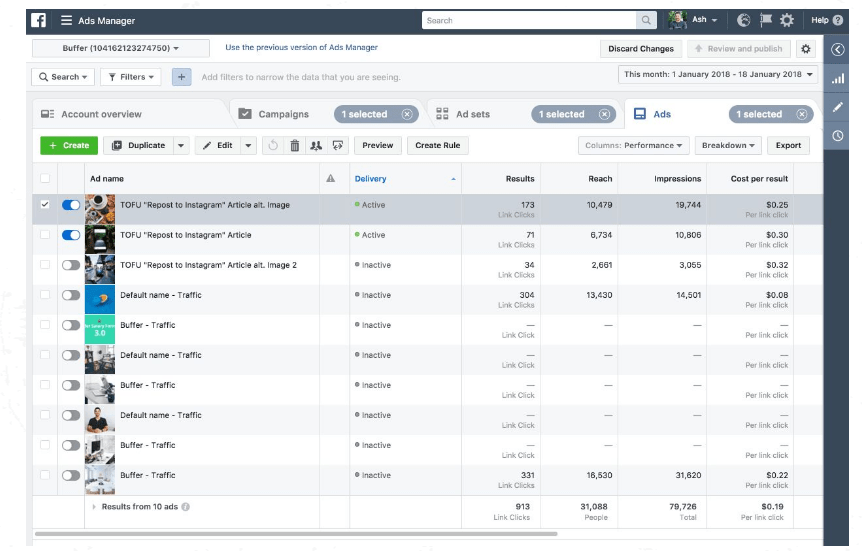
Your Facebook ads dashboard is your go-to location for keeping tabs on all your advertisements. To access it, go to manage your ads section from the dropdown in the upper right-hand corner of your Facebook account. The first thing to note is that you have four different tabs. Account Overview, Campaigns, Ad Sets and Ads. Now, the really important thing to note is the date range at the top. This is going to dictate the timeline or timeframe of information that Facebook polls.
How to create advertising reports
In order to understand how your advertising campaigns are performing, reports are essential (Adams, 2019). To access your reports, you’re going to need to be in your ad’s manager account, and you can find that by choosing manage ads from the drop down in the upper right-hand corner of your Facebook profile. You’ll find the reporting section at the top right, and it’s this drop-down menu that’s going to give you a bunch of additional options.
First will be the export table data. It will give you three different formatting options. Xl, csv or export to Facebook ads manager for xl. Next in the drop-down menu will be create custom report and this is where you will get snapshot of how everything is going to export into Excel. In the drop-down menu you are also able to quickly see your recently viewed reports for quick access. It is recommended that you check your advertisements daily.
Understand your success metrics
It’s really important to understand your success metrics. The things that you want to focus on right away are shown in the Campaigns tab. From the left you have Campaign Name, delivery status, where the budget is allocated, and results, which is where you really want to focus on. This is where you will be able to see data on impressions, how many people it reached, amount spent and how many link clicks.
View you billing summary
Facebook will show your advertising spend in two different ways. Under the amount spent you will be able to view of where your advertising money is going. It gives you a graph to get information per date on your spending. If you further scroll down you can see advertising spend broken out by objective. Continuing down you will be able to see the demographics. This is one really easy way to see how much you’ve spent advertising, but it might not show you what’s been billed to your credit card. in order to view that, we’re going to head to the Ads Manager menu and select billing and payment methods. This will show you payment method, amount billed and payment status.
Implement Best Practices
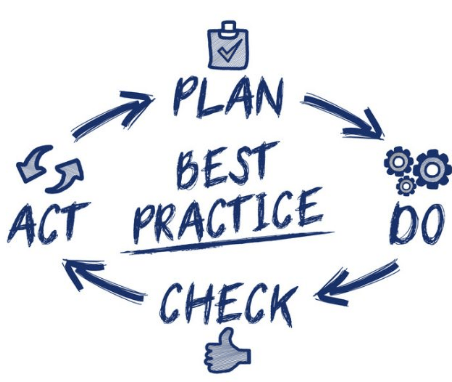
Here are some must-know practices that will apply to your Facebook ad campaigns that will make your ads more powerful and truly connect you with your targeted audience.
- Clear call to action
- Highlighting any major benefits your product has over the competition
- Use a simple, eye-catching image.
- Have someone else review your ad
- Test and run multiple variations
How to choose an effective image for your ad
Great ad copy can be easily lost in the Facebook Newsfeed without a captivating image. When your deciding on your image think of the following:
- Stock images make it super easy to have high-quality photos at your fingertips.
- Use images featuring people and bright colors
- Consider how the image would look in a small size
- Test your images
Improve the performance of your ads
Here are some ways to improve your ad performance
- Are they relevant?
- Create a landing page
- Analyze reporting data
- Target specific device users
- Are your ads running to often?
- Never stop testing and trying new things
Key Facebook ad policies
Your success with Facebook Ads is dependent on following some key guidelines. Here are some major policies to help you prevent your ads from being flagged for review.
- Ads in the news feed can’t have images with more than 20% of text on them.
- The landing page must be relevant to your ad
- Be respectful and honest
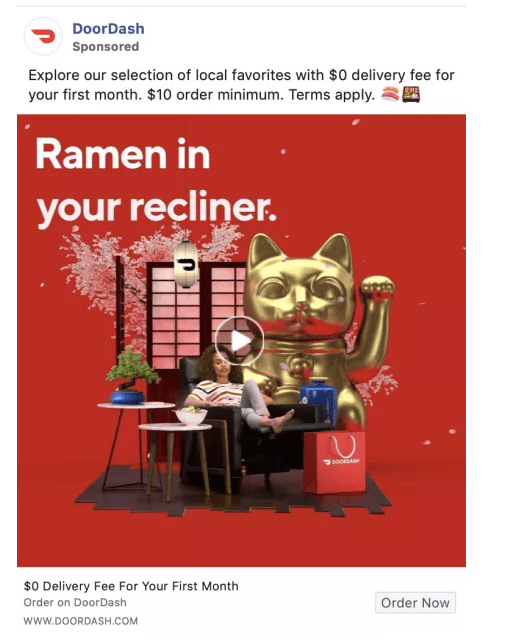
Here is an example of a Facebook Ad by DoorDash. Following the above tips and staying within the Facebook policies they were able to create a very high quality but simple Ad that would catch your eye.
Conclusion
In my own opinion, Facebook is one of the best platforms for a beginner to create an ad. They offer you multiple budget plans to help you get started as well as a very clear and precise way of viewing your ads and tracking its data. Some of the important points to take away: Be sure to keep trying and don’t give up it wont be perfect on the first try, know what your audience is and how your going to target them, and be creative with your ad. Social media marketing is massive and your going to be constantly competing against other ads, be sure not to get down if it doesn’t start out as planned. Adjustments of your ad and your target market will have to be constantly monitored and the ability to adapt is essential. Will you give up if it doesn’t work at the start or will you stay persistent until its perfect?
References
Adams, M. (2019, Oct 2). Advertising on Facebook. Retrieved from LinkedIn Learning: https://www.linkedin.com/learning/advertising-on-facebook-2/next-steps?u=2109516
Debono, J. (2012). 5 of the Biggest and Still the Best Online Advertising Methods. Retrieved from https://www.business2community.com/online-marketing/5-of-the-biggest-and-still-the-best-online-advertising-methods-0186358
Karlson, K. (2019, July 22). 162 Best Facebook Ad Examples. Retrieved from https://karolakarlson.com/best-facebook-ad-examples/
Franklin, J. (2018, Dec 10). Why you cant convert Everyone. Retrieved from TRO: https://troleads.com/why-you-cant-convert-everyone/
 Rory Frost